Introduction to UI & UX Design
Welcome to this exciting universe of UI and UX design! Catchy abbreviations for User Interface and User Experience design they form an integral position in shaping how we move in this world of digital. From clicking through a website to making a mobile application, these UI and UX designs work behind the scenes to make a journey smooth and enjoyable.
Imagine your favourite sleek buttons and colourful UI design; the effortless flow and satisfaction that comes from using it is due to UX design. In other words, both work together like peanut butter and jelly to ensure that you have a wonderful digital experience.
But what is the difference between a User Interface design? How do these two complement each other? Dive in to find out what magic defines the fundamental basis of designing user interfaces and crafting memorable user experiences.
Understanding UI Design
UI design is all about the visual aspects of a digital product. It’s all about making things look gorgeous while being supremely functional. So, let’s see what makes UI design an essential aspect of any digital project.
UI stands for “User Interface.” It’s everything that users might interact with while using a digital product, from buttons and sliders to icons and other elements on your screen. Picture UI design as cosmetic touches that make people utter “wow” when they first glance at it, but the longer they spend engaging with the product, the smoother and more delightful interaction it will be.
UI can never be under-estimated. Although an excellent user interface attracts people’s attention, a good user interface keeps them there. First impressions can mean everything in the digital world. Users might bounce off if they find an interface confusing or unattractive and go to find something that works better for them.
In short, UI design is the art and science of ensuring that users have the best experience with the product’s look and feel. Therefore, good UI design can develop a brand, build customer loyalty, and thereby lead to successful business results.
Key Elements of UI Design
In any project, creating a compelling user interface involves several critical elements:
Consistency: The design should present a consistent theme and function. Similar actions must have similar steps, a consistent color scheme, as well as a corresponding font set.
Typography Use of readable, consistent fonts. Typography can communicate the tone of the product, that something is important, as well as give off different hierarchy information.
Color Palette: Colors are potent elements for design in UI. They provide the mood and brand identity and help create attention towards specific areas that are created within an interface.
Layout: A clean and organized layout will provide users with the ability to find exactly what they need quickly and without confusion. Components should align neatly intuitively.
– Imagery and Icons: These aspects should be carefully selected not to hinder the usability of the product but at the same time appear very aesthetically pleasing.
– Feedback: Such visual cues or indications in the form of loaders or error messages must also be provided to notify the user that their action is being recognized.
Tools and Resources for UI Designers
To combine all these harmoniously, UI designers use a variety of tools and resources. Here are some commonly preferred ones:
– Sketch: a platform that is popular for smoothness in making wireframes and designing interfaces quickly.
Adobe XD: It is a vector-based tool for making interfaces for web apps and mobile apps, focusing on prototype and design
Figma: Popular for real-time collaboration with team members. It supports the interface design as well as prototyping.
Invision: This is great for collaboration and prototyping, where designers create interactive designs to share with stakeholders and get feedback.
– Canva: More of a broad design tool, it’s great for producing rapid UI elements while prototyping.
In addition to the resources above, there are many blogs about UI design, and online courses as well as design communities like Dribbble and Behance that are an inspiration and include tutorials for both beginners and veterans alike.
Understanding UX Design
While UI strongly focuses on the digital product’s appearance and structure, UX design refers to the feel of interaction with users who interact with the product. Now we see why UX design plays an important part in making seamless user experience.
User Experience” short form of “UX”. UX: This is the whole way a user experiences while doing some activity in the product or service, starting from first glance at the screen and ending with closing an application, while accomplishing the done task.
The core intent of UX design is to give an experience that is efficient and intuitive-pleasurable to the users. When a UX design has been well thought out, then the pain points of the user are considered so that frictionless interactions are ensured, and it guides towards the goals without much effort.
The beauty of UX is that it impacts user satisfaction, which relates to improving usability, accessibility, and enjoyment one experiences while interacting with the product. A great UX can lead to user retention, good reviews, and even word-of-mouth for a business.
Some core elements are the pillars of a good UX:
– Researching the Users: To know their needs, behaviors, and motivations, using diverse research methodologies like surveys, interviews, and usability tests.
Information Architecture: Organizing, structuring, and labelling the content in such a manner that users could retrieve it most effectively.
Wireframing and Prototyping: The wireframes serve as blueprints for the design, giving the minimum platform, but prototypes are clickable models to simulate the flow of the user.
Usability: The product is designed to be used by identified users to achieve specific goals effectively, efficiently, and satisfyingly in a specified context of use.
– Accessibility: Design for accessibility is about accommodating the needs of users with disabilities; guidelines like the Web Content Accessibility Guidelines (WCAG) form some basis for this.
– Interaction Design: It refers to designing engaging interfaces that are well-thought-out for behaviors and interactions.
User testing: Obtains feedback from actual users on pain points and possible areas to be improved.
Tools and Resources for UX Designers
Tool set for UX design professionals
UX designers have a set of tools and resources in their arsenal that help them create user-centered designs. Among these are:
Axure RP: A tool designed to help in building functional and interactive prototypes without the need to write a single line of code.
– Balsamiq: Known for its wireframing tools that aim to replicate the experience of sketching on a whiteboard, simple yet effective.
– Miro: A collaborative online whiteboard platform designed to help members of a team work effectively together, perfect for brainstorming and aligning on UX requirements.
– Optimal Workshop: Offers tools for undertaking UX research, such as card sorting and tree testing, to optimize the information architecture.
– Lookback.io: A tool for doing user research and prototype testing with real users, to receive rapid feedback.
Research tools
UX designers often complement these tools with other resources like books on UX design, industry-led workshops, webinars, and their networking through LinkedIn and UX-focused forums. For example, engaging with the resources above ensures they are updated on the trends and keep fueling their creative problem-solving abilities.
Using your knowledge of UI and UX design, you will be able to craft digital experiences that are not only beautifully designed but also highly gratifying to the users. Whichever the stage is- be it at the initial stage or a level of improvement of what you know so far, mastering these ingredients sets one on the path to design excellence.
Differences Between UI and UX Design
There is nothing more wonderful than UI and UX in making delightful digital experiences. While perhaps similar-sounding, each fulfills a very distinct role in the world of design. Let’s delve into each to unlock their unique roles, responsibilities, processes, and, ultimately, their impact on the user’s journey.
Roles and Responsibilities
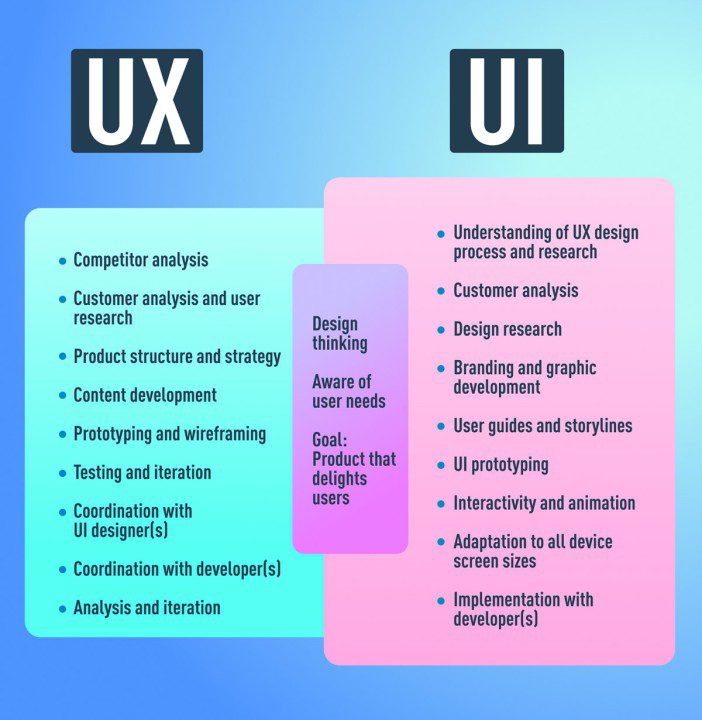
Ultimately, it all comes down to the UI design, the look and feel of a product. A User Interface designer centers their attention around aesthetic elements: making sure an app or website isn’t just something nice to look at but also consistent. They are the ones behind the buttons, icons, color schemes, typography, and layout. That is to say, they aim to come up with intuitive interfaces that are attractive to use.
On the other hand, UX design, or User Experience design, is about the frictionless creation of a user journey. In this context, UX designers research the behavior of users and ensure that every interaction with a product has a meaningful value. They dig deeper into understanding the user’s needs and desires, as well as the research, so every step within the user experience will be possible to make it both smooth and enjoyable. They create the first steps towards making real products; they do user tests, which means improving the flow of the product.
Think of UI as the look and controls of the car while UX is the overall driving experience. Both have to work very well with one another so that users enjoy their time in the driver’s seat.
Process and Methodology
UI and UX design both have varied processes and methodologies, which fit each other very beautifully.
– UI Design Process:
– Wireframing: Starting from wireframes enables the organization of elements on a screen.
Creativity and Details: Design color palette, select fonts, and design system that can define brands.
Prototyping: Development of interactive designs to understand how some of the design elements interact with each other
USER EXPERIENCE DESIGN PROCESS
Research: Interpretation of the user’s needs through surveys, interviews, and data analysis.
User Personas & Scenarios: Develop user personas, empathizing with users.
User Testing & Feedback: Conduct sessions to test usability and gather insights for improvement.
Often, both UI and UX designers work together, sharing their respective findings and feedback to ensure their design delivers what the end user needs and ensures business goals are met.
Effective User Experience
The impact of UI and UX design can never be overstated. A beautiful design catches the eye of a user, but a thoughtful experience brings them back. Let’s look at what good UI and UX will be able to bring about:
– Engagement: A good-looking interface paired with a great user experience has a far higher rate of engagement. More are likely to spend time on a platform that’s a breeze to use and feel delightful to wield.
User satisfaction: If they can find what they want in the shortest frictionless and confusing way possible, users are satisfied. Happy users are happy, loyal customers who can become advocates for your brand as they go around sharing their experiences.
Efficiency: Good UI and UX reduce the time users take to do things. Efficiency, in this case, means users will be able to get what they want more quickly, thus more productivity and less frustration.
In a nutshell, an integrated UI and UX design will lead the user through every stage of the process, create confidence, and, therefore, enable a whole connection to the digital product. Good designs can become unforgettable experiences when you know the differences and how they coexist be it the designing of a website, an app, or a new digital interface.
All of this can only be explained by developing user-friendly digital experiences that connect to the people. While UI is concerned with the actual layout, the visual appeal, and the interaction with the user, UX focuses on creating a seamless and meaningful journey for the user.
So, considering this, remember the crux of good design:
– Focus on the needs and feedback of the user.
– Be simple and intuitive.
– Be in line with current trends and tools.
Enterprise should incorporate intuition with strategy to develop user-thrilled designs. Whether you are designing a new app or renovating a website, mastering your field in UI and UX will equip you to transform ideas into exciting digital products.